How to review sending sources
How DMARCdrift categorizes senders and how to decide whether an unknown source is expected, misconfigured, or spoofing.
The sending sources table shows every IP range that sent mail claiming to be from your domain during the selected period, as reported by receivers. Reviewing sources is how you identify which services need DMARC configuration and whether any unauthorized traffic is targeting your domain.
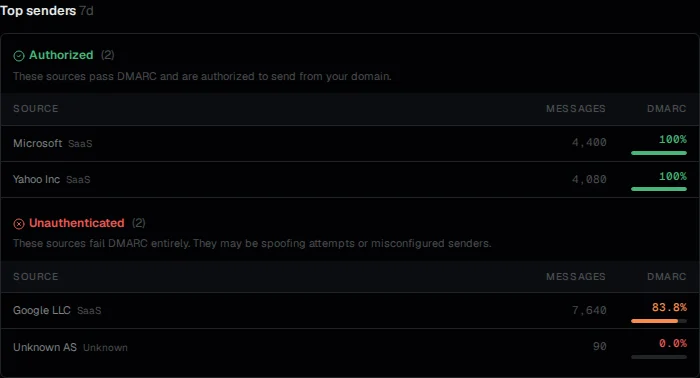
How sources are identified
Aggregate reports include the sending IP for each group of messages. DMARCdrift resolves IPs to their owning organization using IP registration data and maps recognizable IP ranges to known services (Google, Microsoft, Amazon SES, and others).
If a message carries a DKIM signature, the d= domain in the signature is also shown. For sources that sign with a domain you recognize (like d=yourdomain.com), this is the most reliable way to attribute traffic to a specific service.
Sources are grouped by IP block, not by individual IP address. A single ESP sending from a /24 block appears as one source row.
Sender categories
Each sender row shows a small colored dot next to the sender name indicating its inferred business category:
- Green: transactional (receipts, notifications, password resets, system alerts)
- Yellow: marketing (campaigns, newsletters, bulk broadcast)
- Cyan: internal (your own mail servers or infrastructure)
- No dot: unknown (not enough signal to classify)
Categories are inferred automatically from the sender name, volume patterns, and alignment characteristics. They are not editable. The category is a quick orientation aid: it tells you at a glance whether a failing source is your transactional pipeline, a marketing tool, or something you should investigate further. Two senders with the same category can still have different alignment setups, so the category does not replace reviewing the alignment columns.
Reading the alignment columns
For each source, the table shows:
- Messages: total messages from this source during the period
- Aligned: messages that passed DMARC (at least one mechanism aligned)
- DKIM: whether DKIM authenticated and whether the
d=domain aligned - SPF: whether SPF authenticated and whether the envelope sender domain aligned
A source can have DKIM "pass" but DMARC "fail" if the DKIM d= domain doesn't match your From: domain, for example if an ESP is signing with their own domain (d=sendgrid.net) rather than yours. This is the most common misconfiguration for sources that "look" like they're working but still fail DMARC.
Working through the source list
Start with the highest-volume failing sources. For each one:
Step 1: identify the service. The IP organization label and DKIM d= domain usually point to a specific ESP or platform. If you recognize the service, proceed to step 2.
Step 2: check whether it's configured. Look up the service in your account. If you're using the service to send email as your domain, check whether DKIM is set up. For most services, DKIM requires publishing a DNS record they provide. See the vendor setup guides for Google Workspace, Microsoft 365, SendGrid, Postmark, Resend, or Amazon SES.
Step 3: if you don't recognize the service. A source you can't attribute to a known sending service is either a misconfigured tool a team member added, or unauthorized sending. Check with your team first. If you still can't identify it, see what to do when DMARCdrift detects an unknown sender.
Sources that will always have some failures
Mailing list forwarding: If your users are subscribed to mailing lists, replies or forwards from those lists may appear as traffic claiming to be from your domain. These fail SPF (envelope sender rewritten) and sometimes DKIM (if the list modifies message content). This is expected and generally not worth trying to fix.
Old test sends: A single test send from a new service before DKIM was configured shows up in reports for the duration of the reporting window. Once the configuration is in place and a full reporting period passes, that source should move to passing.
See also: What to do when DMARCdrift detects an unknown sender: step-by-step investigation for sources you don't recognize. DKIM alignment: why a service can pass DKIM but still fail DMARC alignment.
What your DMARC alignment rate means
What the alignment percentage measures, why 100% isn't always immediate, and what to investigate when it drops.
DNS posture vs domain health
DNS posture shows what DMARC, SPF, and DKIM records exist. Domain health shows whether those records are working correctly in your mail flow.