DNS posture vs domain health
DNS posture shows what DMARC, SPF, and DKIM records exist. Domain health shows whether those records are working correctly in your mail flow.
The right column of the domain dashboard shows two related but distinct panels: DNS posture and domain health. They answer different questions. DNS posture asks "what's published?" Domain health asks "is it working?"
DNS posture
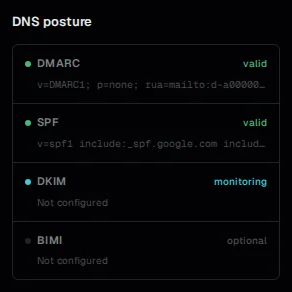
DNS posture shows your current published records for four protocols: DMARC, SPF, DKIM, and BIMI. Each row shows the record type, its current value or status, and a validity indicator.
Valid: the record exists and parses correctly. For DMARC, this means v=DMARC1 is present and the syntax is valid. For SPF, this means the record starts with v=spf1 and has a valid terminating mechanism.
Warning: the record exists but has a detectable issue. Examples: an SPF record over the 10-lookup limit, a DMARC record with a valid p= but a missing or malformed rua=.
Missing: no record was found at the expected hostname. For DMARC, this means nothing is published at _dmarc.yourdomain.com.
Monitoring: used for optional protocols (DKIM, BIMI) where the absence of a record isn't necessarily a problem, but DMARCdrift is watching for changes.
DNS posture is checked daily. If you make a DNS change, expect the display to update within 24-48 hours.
Domain health
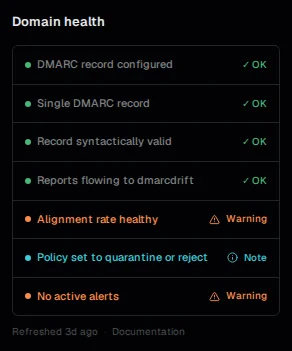
Domain health is a checklist of conditions that indicate your domain is properly configured for DMARC alignment. Where DNS posture asks whether a record exists, health asks whether the record is doing what it needs to do.
DMARC record present: same as the DNS posture check — verifies the record exists and is valid.
DMARCdrift rua= address detected: verifies that your DMARCdrift inbound address appears in the published rua= tag. A valid DMARC record that doesn't include your address means reports are going elsewhere.
Reports received: confirms that DMARCdrift has actually received aggregate reports for this domain. DNS can look correct but reports may still not arrive if the rua= address was recently added and the first reporting period hasn't completed.
DKIM configured: checks whether any of your sending sources are producing DKIM signatures with your domain in the d= field. A domain can have a valid DMARC record but no DKIM setup, which limits how reliably mail can align.
Alignment rate above threshold: flags if your alignment rate has dropped below a level that would make enforcement inadvisable.
The practical difference
A domain that passes all DNS posture checks can still fail health checks. The most common example: a domain with a valid DMARC record and correct SPF, but no DKIM signing. DNS posture shows green for DMARC and SPF. Health shows a warning on DKIM and possibly on alignment rate — because SPF alone, without DKIM, means forwarded mail will always fail DMARC.
Use DNS posture to confirm that your records are syntactically correct and published. Use domain health to understand whether they're actually achieving DMARC alignment.
See also: Enforcement readiness: the full checklist before moving from p=none to enforcement. DKIM alignment: why DKIM is the more reliable alignment path compared to SPF alone.