What your DMARC alignment rate means
What the alignment percentage measures, why 100% isn't always immediate, and what to investigate when it drops.
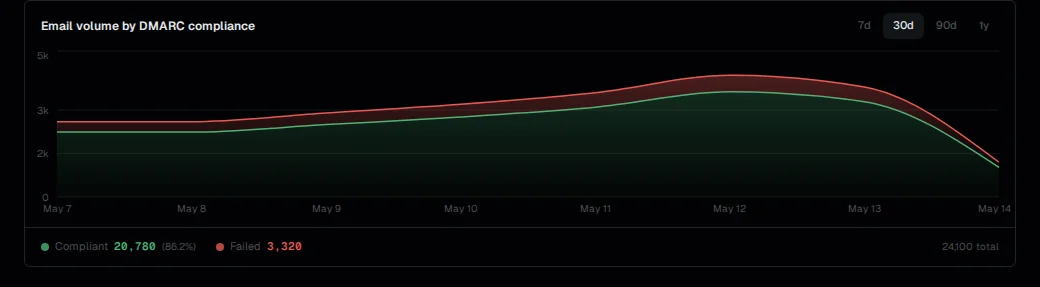
Your DMARC alignment rate is the percentage of reported messages where at least one authentication mechanism (DKIM or SPF) passed with correct domain alignment. It's the primary metric for understanding whether your sending infrastructure is properly configured and whether your domain is at risk from spoofing.

How the rate is calculated
For each message that appears in aggregate reports:
- Receivers evaluate DKIM: did the message carry a valid signature where
d=matches yourFrom:domain (under relaxed or strict alignment)? - Receivers evaluate SPF: does the envelope sender domain match your
From:domain? - If either passes with alignment, the message counts as aligned.
The alignment rate is aligned messages ÷ total reported messages × 100.
DMARCdrift calculates this over the last 30 days by default, aggregating across all reporters.
Why the rate is rarely 100% right away
Several legitimate factors keep the rate below 100% at first:
Forwarding: Mail forwarded through mailing lists or relay servers often fails SPF (the envelope sender is rewritten) and may fail DKIM (if the relay modified the message). This is expected behavior, not a misconfiguration. See SPF alignment for why forwarding breaks SPF.
Not-yet-configured senders: A service sending on your behalf that doesn't have DKIM set up yet. Each unknown source you identify and configure moves the rate up.
Older email in the reporting window: If you just added DMARC and configured your senders, reports from before the configuration change are still counted in the 30-day window. The rate improves as older data ages out.
Low-volume sources: Some sources only send occasionally. They appear in reports irregularly, and a few failing messages from a low-volume source has an outsized effect on the percentage.
What a healthy alignment rate looks like
For a domain with well-configured senders:
- 95%+ is a reasonable baseline for most production sending domains. Some forwarded traffic and transient sources are expected.
- 98–100% is achievable for domains with a small number of well-controlled sending services and no forwarding chains.
Below 90%, you likely have one or more sending services that haven't been configured for DKIM alignment. Review the sending sources table to identify the largest failing sources.
What to investigate when the rate drops
A sudden drop after a period of stability usually means one specific thing changed. Work through:
- Check the sending sources table. Which source accounts for the most failing messages in the drop period?
- Check whether DKIM records are intact. Some services rotate keys; if the DNS record wasn't updated, DKIM failures follow. Use the DKIM check tool.
- Check whether your DMARC record changed. A policy change or accidental removal of the
rua=address won't directly affect the rate, but can affect reporting. See policy history. - Check for a new sender. A team member may have connected a new tool that sends mail as your domain.
For a sustained decline rather than a sudden drop, see DMARC alignment regression.
See also: DKIM alignment: how DKIM signing domain matching works. Enforcement readiness: what alignment rate you need before moving to p=quarantine or reject.