Using policy history to debug DMARC changes
What changes DMARCdrift tracks and how to use the policy timeline when debugging deliverability problems.
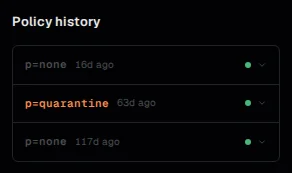
The policy history panel shows a chronological record of changes to your domain's DMARC policy. Each entry represents a state detected by the daily DNS poll that differs from the previous state.
What gets recorded
Policy history captures:
- Policy changes: when
p=changes from one value to another (for example,none→quarantine, orquarantine→reject) - Subdomain policy changes: when
sp=is added, removed, or changed - Record appearance: when a DMARC record is detected for the first time or after being absent
- Record disappearance: when a previously present record stops resolving
Changes to other tags (rua=, adkim=, pct=, etc.) are reflected in the record value shown for each entry but don't trigger separate entries on their own.
Reading the timeline
Each entry in the timeline shows:
- Date: when the change was detected (the day of the DNS poll that first returned the new value)
- Record value: the full DMARC TXT record at the time of detection
- Policy tag: the
p=value for that entry, displayed as a badge for quick scanning
Entries are shown in reverse chronological order. The top entry is the current state.
Using it to correlate changes with alignment behavior
The most common use case: your alignment rate dropped on a specific date, and you want to know if a DNS change caused it.
Check whether a policy history entry coincides with the date of the drop. A record disappearance or a change from reject to none would explain certain report behavior changes. A record edit that inadvertently removed the rua= address wouldn't change the policy badge but would show the updated record value where you can verify the rua= content.
If the alignment rate dropped and there's no corresponding policy history entry, the cause is more likely a sending service configuration change — a DKIM key rotation, a new ESP, or a new subdomain — rather than a DNS record edit.
What policy history doesn't capture
Policy history only records changes. If your DMARC record has been p=none since you first set it up with no changes, there may be only one entry (the initial detection). A single-entry history isn't a problem — it just means the record hasn't changed.
The polling cadence is daily, so changes made and reverted within the same day may not appear if the poll ran before the change and after the revert. In practice this is rare.
See also: Why DMARC reports stopped arriving: when a DNS change removes the rua= address and what to check. Enforcement readiness: using policy history as part of your pre-enforcement review.
DNS posture vs domain health
DNS posture shows what DMARC, SPF, and DKIM records exist. Domain health shows whether those records are working correctly in your mail flow.
DMARC record reference
Reference for every DMARC TXT record tag in RFC 9989 (DMARCbis): v=, p=, sp=, np=, t=, psd=, rua=, ruf=, adkim=, aspf=, fo=, plus the removed pct=, rf=, and ri= tags.