Managing domains
How to add and verify domains in DMARCdrift, manage your domain list, and what happens to historical report data when a domain is removed.
DMARCdrift monitors one domain per entry in your account. Each domain gets its own inbound reporting address, its own dashboard, and its own alert configuration.
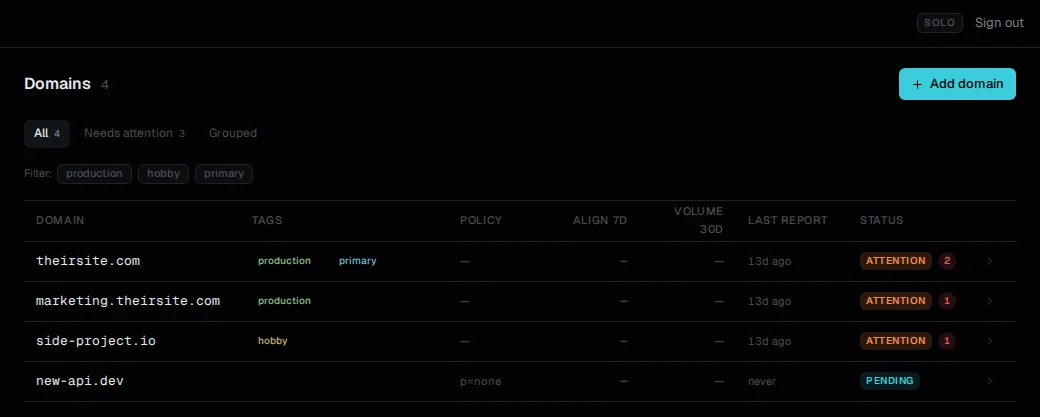
Adding a domain
From the dashboard, click Add domain and enter the apex domain — yourdomain.com, not www.yourdomain.com or a subdomain. DMARCdrift creates an entry for the domain and assigns a unique inbound address in the format d-abc123@in.dmarcdrift.com.
After adding the domain, the next step is publishing that address in your DMARC record's rua= tag. See add DMARCdrift to your DMARC record for DNS record examples.
Domain limits by plan
Each plan allows a maximum number of monitored domains:
| Plan | Domain limit |
|---|---|
| Free | 1 |
| Solo | 15 |
| Pro | Unlimited |
If you're on the free plan and want to monitor a second domain, you'll need to upgrade. The upgrade page is accessible from settings.
What "monitoring" means for a domain
A domain is actively monitored as soon as it's added. DMARCdrift:
- Polls
_dmarc.yourdomain.comdaily to check the DMARC record and detect policy changes - Accepts aggregate reports sent to your assigned inbound address
- Evaluates alert conditions daily after aggregate report processing
Monitoring doesn't require DNS verification in the traditional sense — you don't need to add a verification TXT record. The domain is considered set up when your inbound address appears in the published rua= tag and reports start arriving.
Removing a domain
To remove a domain, go to the domain's settings and select Remove domain. Removal is permanent and non-recoverable. Before removing:
- Any aggregate reports received up to the point of removal are deleted from storage
- The inbound address is decommissioned; any reports sent to it after removal are discarded
- Alert history and policy history for the domain are deleted
If you're removing a domain because you're restructuring your account (for example, moving from one email domain to another), wait until you've set up the new domain before removing the old one — there's no way to recover historical report data after deletion.
Reassigning the inbound address
Each domain's inbound address is derived from its internal identifier and cannot be changed. If you remove a domain and re-add it, it will receive a different inbound address. You'd need to update the rua= tag in your DNS record with the new address.
Next: Report history and data retention: how long reports are stored and what happens at plan limits. Add DMARCdrift to your DMARC record: DNS record format and examples.
Report history and data retention
How long reports are retained by plan tier, what happens when limits are reached, and export options.
Billing and plan limits
Overview of Free, Solo, and Pro plan limits in DMARCdrift: domain caps, report retention, how limits are enforced, and how to change your plan.